Preview a haircut and arrive with a clear stylist brief
Start with a mirror test, narrow the choice to two or three cuts, then use an AI preview if a picture would help. Bring the original photo, the preview and your styling routine to the salon so your stylist can assess what is achievable.
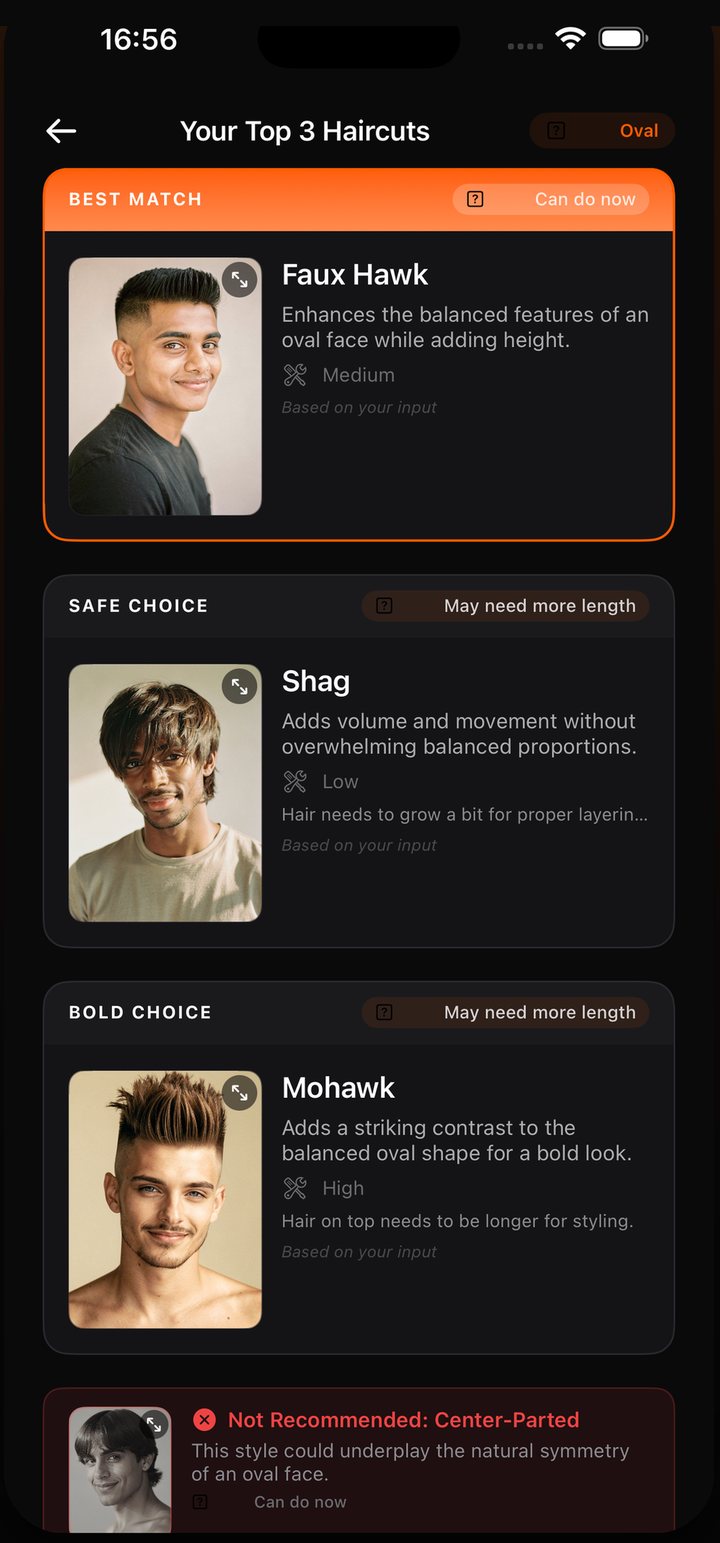
HairMatch AI supports that process with Top 3 recommendations, reasons, upkeep and readiness notes, personal previews and a stylist reference card. The first analysis is free; personal AI previews require purchased looks.
Publisher disclosure. This guide is written by the makers of HairMatch AI - Haircut Preview, developed by 志欣 何 (He Zhixin). Our official iOS app is App Store ID 6761456212. We have a commercial interest in HairMatch AI; this is not an independent review.
On this page
1. Start with an offline preview
Use a mirror in even light to explore a change before purchasing anything. Pin longer hair under at the jaw to approximate a bob, hold a section forward to explore a fringe, or pull hair away from your face to compare how much framing you prefer.
Photograph the versions from the same angle. These are rough approximations: pinned hair will not fall exactly like a real cut, and a camera can distort proportions. They can still help you describe what you like about a shorter length or a different outline.
2. Choose two or three cuts and write down why
Pick a familiar option, one that fits your daily routine and a bolder option you want to discuss. For each, note the preferred length, fringe, parting, likely upkeep and what you need to ask about growing or cutting your current hair.
You can use our ChatGPT consultation prompt if the relevant tools are available in your account, or start with HairMatch AI's first free analysis. HairMatch AI organises the result into a Top 3 shortlist, reasons, maintenance levels, readiness notes and one style it does not recommend. These are suggestions to discuss, not rules about what you are allowed to wear.
3. Generate selected previews if you want a visual reference
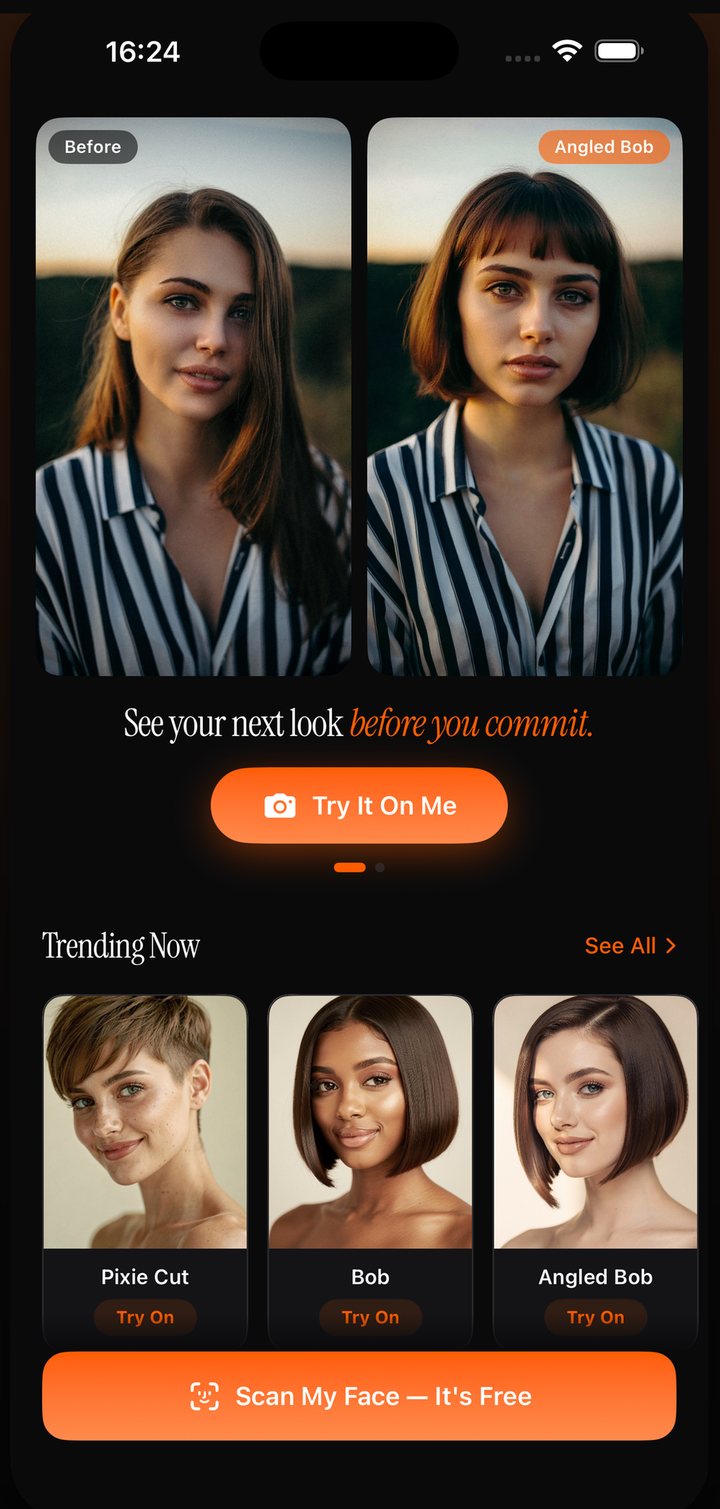
For an AI preview, use a clear front-facing photo in even light, with your hairline visible and no beauty filter. Generate a specific cut rather than asking for an undefined “better hairstyle”. Keep the original beside the output and check that your face, expression and hairline have not changed.
HairMatch AI personal previews use purchased looks. The first free analysis includes recommendations, not a free generation on your own photo. One-time purchase options can suit a single salon visit; read what is included before purchasing looks. Competitor free previews and consultation fees vary, so confirm the terms before using them.
4. Put the picture and your preferences in one brief
HairMatch AI's stylist reference card keeps a selected preview with haircut context, including reasons, maintenance and readiness notes. Use it as a conversation aid, and add your own preferences. Here is a brief you can copy even if you do not use the app:
Show the original photo, the checked preview and one reference of real hair if you have one. Mark which details matter to you and which are flexible. A screenshot is an interface example, not evidence that a stylist has endorsed the cut or that a customer obtained the pictured result.
5. Let the stylist check feasibility before cutting
Ask about current length, density, curl pattern, cowlicks, how the hair falls and the styling needed to maintain the shape. AI readiness notes are based on supplied information and may be wrong. The stylist can assess your hair directly and propose an adaptation.
Book a consultation if you want this discussion before a haircut appointment. Confirm the fee and booking terms with the salon; a consultation is not universally free. Ask how the cut is likely to change between trims, and decide with that upkeep in mind.
Start with three haircut options
Your first face-shape analysis and Top 3 haircut recommendations are free. AI hairstyle previews generated from your own photo require purchased looks. One-time purchase options are available; check the current in-app offer before paying. See what is free and how looks work.
View HairMatch AI on the App StoreCommon questions
How can I preview a haircut for free?
A mirror test with pinned or repositioned hair costs nothing and can help compare rough length and framing. HairMatch AI’s first free analysis gives a Top 3 shortlist but does not include a personal AI preview. Confirm fees for any salon consultation or other app you use.
Can I prepare for a haircut without downloading an app?
Yes. Use a mirror, offline reference photos and the copyable stylist brief on this page. Ask your salon about booking a consultation and its fee.
How should I show an AI haircut preview to a stylist?
Label it as AI-generated, bring your original photo and describe the length, fringe, shape and routine you want. Ask the stylist to adapt it to your current hair. HairMatch AI offers a stylist reference card to organise that context.
Does an AI preview prove a haircut will work on me?
No. A generated image can alter facial features or assume a different texture, length or density. Compare it with the original and ask a stylist to assess feasibility before cutting.
Does HairMatch AI include a free preview of my own hair?
Your first face-shape analysis and Top 3 haircut recommendations are free. AI hairstyle previews generated from your own photo require purchased looks. One-time purchase options are available; check the current in-app offer before paying.
Updated: 8 September 2026 (UTC).